> ## Documentation Index
> Fetch the complete documentation index at: https://docs-staging-fix-docs-5528-php-updates.mintlify.site/llms.txt
> Use this file to discover all available pages before exploring further.

> Configure an update policy form using Forms for Actions

# Use Cases: Configure an update policy form using Forms

<Card title="Before you start">
  1. Create a [Machine-to-Machine Application](/docs/get-started/auth0-overview/create-applications/machine-to-machine-apps) with the following scopes enabled:

  * `read:users`
  * `update:users`
  * `create:users`
  * `read:users_app_metadata`
  * `update:users_app_metadata`
  * `create:users_app_metadata`

  2. Add a [Vault connection](/docs/customize/forms/vault) using the M2M application credentials.
</Card>

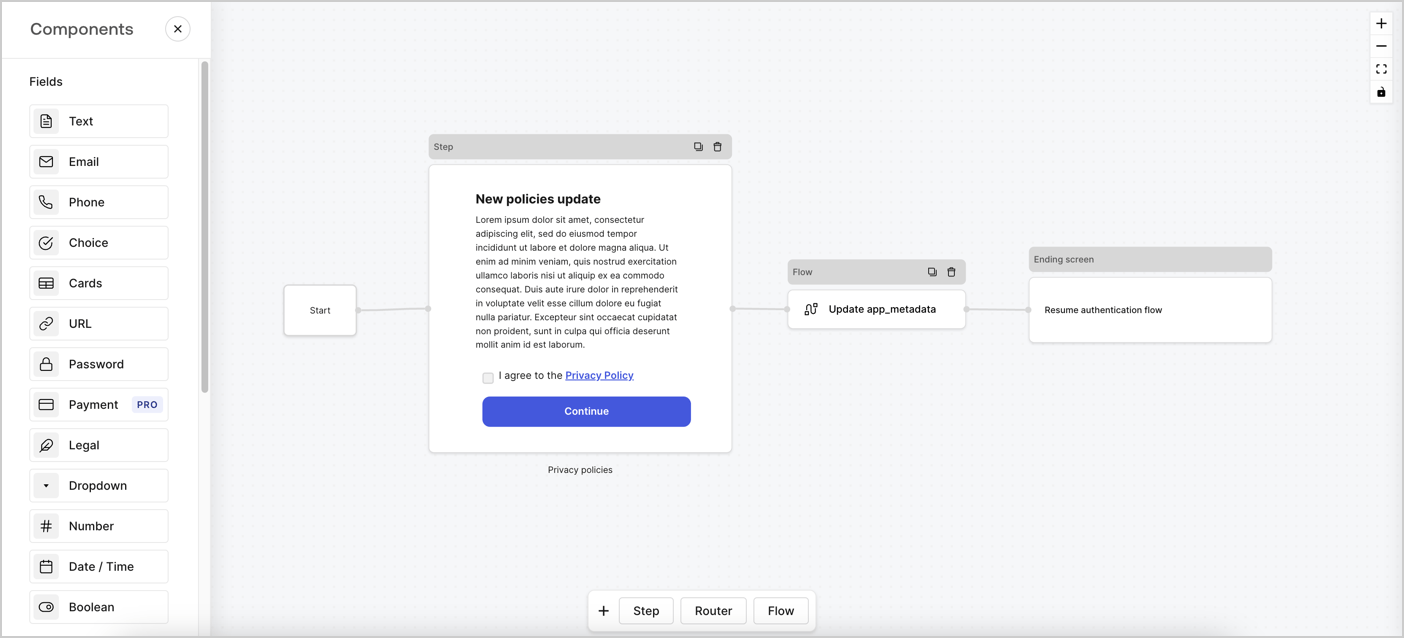
Forms for Actions allows you to create custom privacy policies flows and store the consent under the `app_metadata` object.
<Frame>
  <img src="https://mintcdn.com/docs-staging-fix-docs-5528-php-updates/UZQyD4QENz6NalUU/docs/images/cdy7uua7fh8z/6i68dMvHDTijfRmSgN1x8Q/ad900e7d4c0fb34645921435472b8684/privavy-policy-form.png?fit=max&auto=format&n=UZQyD4QENz6NalUU&q=85&s=759a998902f82f037fde4f23074ff396" alt="Dashboard > Actions > Forms > Privacy policy use case" data-og-width="1404" width="1404" data-og-height="638" height="638" data-path="docs/images/cdy7uua7fh8z/6i68dMvHDTijfRmSgN1x8Q/ad900e7d4c0fb34645921435472b8684/privavy-policy-form.png" data-optimize="true" data-opv="3" srcset="https://mintcdn.com/docs-staging-fix-docs-5528-php-updates/UZQyD4QENz6NalUU/docs/images/cdy7uua7fh8z/6i68dMvHDTijfRmSgN1x8Q/ad900e7d4c0fb34645921435472b8684/privavy-policy-form.png?w=280&fit=max&auto=format&n=UZQyD4QENz6NalUU&q=85&s=27bb8704cfed0c00f0c77e189d65a917 280w, https://mintcdn.com/docs-staging-fix-docs-5528-php-updates/UZQyD4QENz6NalUU/docs/images/cdy7uua7fh8z/6i68dMvHDTijfRmSgN1x8Q/ad900e7d4c0fb34645921435472b8684/privavy-policy-form.png?w=560&fit=max&auto=format&n=UZQyD4QENz6NalUU&q=85&s=0bfd2012a05858deae5e6a0fe7d48a7d 560w, https://mintcdn.com/docs-staging-fix-docs-5528-php-updates/UZQyD4QENz6NalUU/docs/images/cdy7uua7fh8z/6i68dMvHDTijfRmSgN1x8Q/ad900e7d4c0fb34645921435472b8684/privavy-policy-form.png?w=840&fit=max&auto=format&n=UZQyD4QENz6NalUU&q=85&s=0cf7777d50bdb5612cdeb151b480e500 840w, https://mintcdn.com/docs-staging-fix-docs-5528-php-updates/UZQyD4QENz6NalUU/docs/images/cdy7uua7fh8z/6i68dMvHDTijfRmSgN1x8Q/ad900e7d4c0fb34645921435472b8684/privavy-policy-form.png?w=1100&fit=max&auto=format&n=UZQyD4QENz6NalUU&q=85&s=510b328b5f0149e52c75d240ba2e64e8 1100w, https://mintcdn.com/docs-staging-fix-docs-5528-php-updates/UZQyD4QENz6NalUU/docs/images/cdy7uua7fh8z/6i68dMvHDTijfRmSgN1x8Q/ad900e7d4c0fb34645921435472b8684/privavy-policy-form.png?w=1650&fit=max&auto=format&n=UZQyD4QENz6NalUU&q=85&s=9a804b7cca38d4a3094d1ed66db74b0f 1650w, https://mintcdn.com/docs-staging-fix-docs-5528-php-updates/UZQyD4QENz6NalUU/docs/images/cdy7uua7fh8z/6i68dMvHDTijfRmSgN1x8Q/ad900e7d4c0fb34645921435472b8684/privavy-policy-form.png?w=2500&fit=max&auto=format&n=UZQyD4QENz6NalUU&q=85&s=f9ab9c19218e311674c2343c435d5521 2500w" />
</Frame>

The sections below outline how you can create an Update Policy form using nodes and flows, along with steps for adding your form to a [Post Login](/docs/customize/actions/explore-triggers/signup-and-login-triggers/login-trigger) Action.

## Create a form from scratch

Follow these steps to create a form to gather information:

1. Open the Form editor by selecting **Auth0 Dashboard > Actions > Forms.**
2. Select **Create Form** > **Start from scratch**.

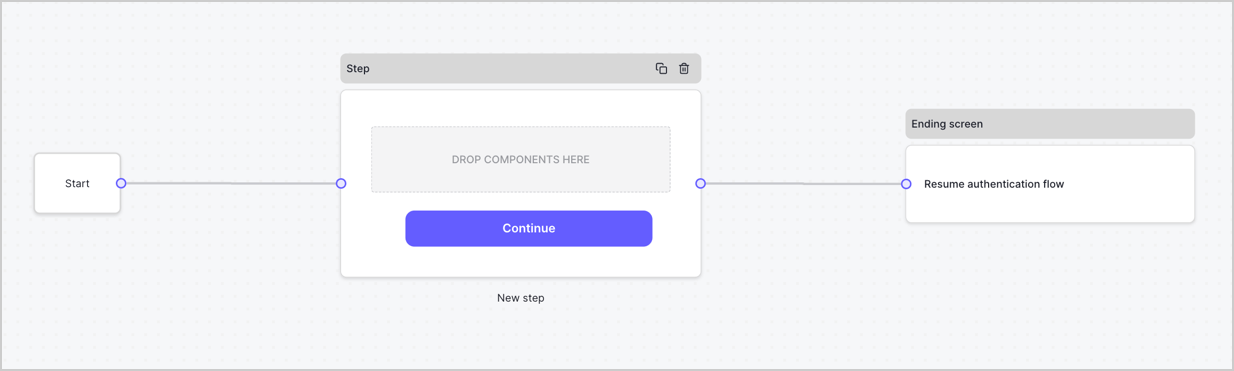
By default, a new form contains a Start node, a Step node, and an Ending screen node.
<Frame>
  <img src="https://mintcdn.com/docs-staging-fix-docs-5528-php-updates/enx8nA6a0JnKZW-5/docs/images/cdy7uua7fh8z/2TZ9jSjgEcARFpULI6hz4R/a4319a1bd482f2ee5cc23100fdb2f42c/New-form-Forms-for-action-use-case.png?fit=max&auto=format&n=enx8nA6a0JnKZW-5&q=85&s=392afe6042c3a0d30fe4d0038172b6ea" alt="Dashboard > Forms > Use Cases > Form" data-og-width="1234" width="1234" data-og-height="371" height="371" data-path="docs/images/cdy7uua7fh8z/2TZ9jSjgEcARFpULI6hz4R/a4319a1bd482f2ee5cc23100fdb2f42c/New-form-Forms-for-action-use-case.png" data-optimize="true" data-opv="3" srcset="https://mintcdn.com/docs-staging-fix-docs-5528-php-updates/enx8nA6a0JnKZW-5/docs/images/cdy7uua7fh8z/2TZ9jSjgEcARFpULI6hz4R/a4319a1bd482f2ee5cc23100fdb2f42c/New-form-Forms-for-action-use-case.png?w=280&fit=max&auto=format&n=enx8nA6a0JnKZW-5&q=85&s=1e4e7654819184117a66576296ecbff0 280w, https://mintcdn.com/docs-staging-fix-docs-5528-php-updates/enx8nA6a0JnKZW-5/docs/images/cdy7uua7fh8z/2TZ9jSjgEcARFpULI6hz4R/a4319a1bd482f2ee5cc23100fdb2f42c/New-form-Forms-for-action-use-case.png?w=560&fit=max&auto=format&n=enx8nA6a0JnKZW-5&q=85&s=c5e9d7f10040ee9dbe75b13ff445a462 560w, https://mintcdn.com/docs-staging-fix-docs-5528-php-updates/enx8nA6a0JnKZW-5/docs/images/cdy7uua7fh8z/2TZ9jSjgEcARFpULI6hz4R/a4319a1bd482f2ee5cc23100fdb2f42c/New-form-Forms-for-action-use-case.png?w=840&fit=max&auto=format&n=enx8nA6a0JnKZW-5&q=85&s=85ecd09b71dfb5bbfc1c77b2752c1263 840w, https://mintcdn.com/docs-staging-fix-docs-5528-php-updates/enx8nA6a0JnKZW-5/docs/images/cdy7uua7fh8z/2TZ9jSjgEcARFpULI6hz4R/a4319a1bd482f2ee5cc23100fdb2f42c/New-form-Forms-for-action-use-case.png?w=1100&fit=max&auto=format&n=enx8nA6a0JnKZW-5&q=85&s=081c570a436bfe8c99c605388761e434 1100w, https://mintcdn.com/docs-staging-fix-docs-5528-php-updates/enx8nA6a0JnKZW-5/docs/images/cdy7uua7fh8z/2TZ9jSjgEcARFpULI6hz4R/a4319a1bd482f2ee5cc23100fdb2f42c/New-form-Forms-for-action-use-case.png?w=1650&fit=max&auto=format&n=enx8nA6a0JnKZW-5&q=85&s=6982850893d8865006a5a29ed784b78d 1650w, https://mintcdn.com/docs-staging-fix-docs-5528-php-updates/enx8nA6a0JnKZW-5/docs/images/cdy7uua7fh8z/2TZ9jSjgEcARFpULI6hz4R/a4319a1bd482f2ee5cc23100fdb2f42c/New-form-Forms-for-action-use-case.png?w=2500&fit=max&auto=format&n=enx8nA6a0JnKZW-5&q=85&s=e35c58f057e819498f572f1a81c2c88e 2500w" />
</Frame>

### Configure the Step node

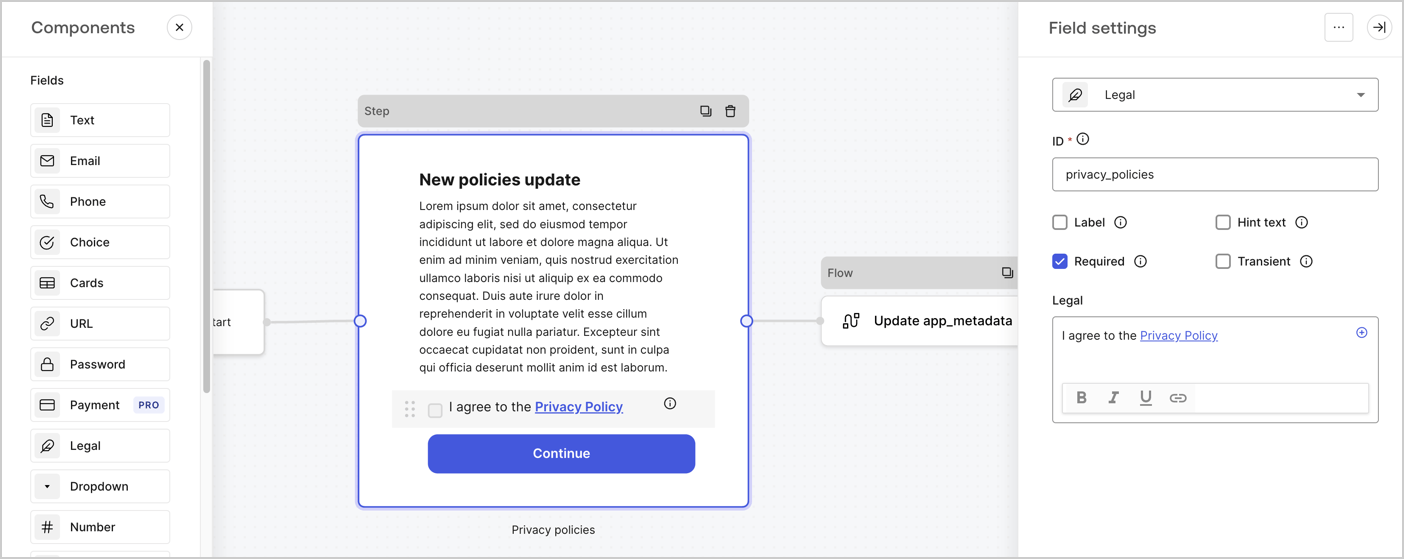
The Step node is the graphical interface visible to users. Add [Fields](/docs/customize/forms/nodes-and-components) to the Step node to collect the new agreement acceptance value by following these steps:

1. Drag a **Rich text** field from the **Components menu** into the **Step** node.

   * **Rich text**: Enter a description of your privacy policies updates.
   * Select **Save**.
2. Drag a **Legal** field into the **Step** node.

   * **ID**: Enter `privacy_policies`.
   * **Required**: Enable the checkbox.
   * **Legal**: Enter `I agree to the Privacy Policy`.
   * Select **Save**.
3. Select **Publish** to save.
<Frame>
  <img src="https://mintcdn.com/docs-staging-fix-docs-5528-php-updates/WuGKF7qp14CKSJ9-/docs/images/cdy7uua7fh8z/59zFFjQjAnjogkc2QGIqqJ/0ad66b1b636544122aa4e65968b76c2c/privacy-policy-step-node.png?fit=max&auto=format&n=WuGKF7qp14CKSJ9-&q=85&s=508483e39021b69135bc9d423e2c6f80" alt="Dashboard > Actions > Forms > Use case privacy policy step node" data-og-width="1404" width="1404" data-og-height="559" height="559" data-path="docs/images/cdy7uua7fh8z/59zFFjQjAnjogkc2QGIqqJ/0ad66b1b636544122aa4e65968b76c2c/privacy-policy-step-node.png" data-optimize="true" data-opv="3" srcset="https://mintcdn.com/docs-staging-fix-docs-5528-php-updates/WuGKF7qp14CKSJ9-/docs/images/cdy7uua7fh8z/59zFFjQjAnjogkc2QGIqqJ/0ad66b1b636544122aa4e65968b76c2c/privacy-policy-step-node.png?w=280&fit=max&auto=format&n=WuGKF7qp14CKSJ9-&q=85&s=99241b274dad65933e55ad788bf26f1c 280w, https://mintcdn.com/docs-staging-fix-docs-5528-php-updates/WuGKF7qp14CKSJ9-/docs/images/cdy7uua7fh8z/59zFFjQjAnjogkc2QGIqqJ/0ad66b1b636544122aa4e65968b76c2c/privacy-policy-step-node.png?w=560&fit=max&auto=format&n=WuGKF7qp14CKSJ9-&q=85&s=bd9ceae40388efea13af00c425bcc565 560w, https://mintcdn.com/docs-staging-fix-docs-5528-php-updates/WuGKF7qp14CKSJ9-/docs/images/cdy7uua7fh8z/59zFFjQjAnjogkc2QGIqqJ/0ad66b1b636544122aa4e65968b76c2c/privacy-policy-step-node.png?w=840&fit=max&auto=format&n=WuGKF7qp14CKSJ9-&q=85&s=c7e38557d8b315d0d23f384a042d83aa 840w, https://mintcdn.com/docs-staging-fix-docs-5528-php-updates/WuGKF7qp14CKSJ9-/docs/images/cdy7uua7fh8z/59zFFjQjAnjogkc2QGIqqJ/0ad66b1b636544122aa4e65968b76c2c/privacy-policy-step-node.png?w=1100&fit=max&auto=format&n=WuGKF7qp14CKSJ9-&q=85&s=add516edbb70a1cea52ab5d267e7cce1 1100w, https://mintcdn.com/docs-staging-fix-docs-5528-php-updates/WuGKF7qp14CKSJ9-/docs/images/cdy7uua7fh8z/59zFFjQjAnjogkc2QGIqqJ/0ad66b1b636544122aa4e65968b76c2c/privacy-policy-step-node.png?w=1650&fit=max&auto=format&n=WuGKF7qp14CKSJ9-&q=85&s=960da43fd6ad279574152cc4b364fb37 1650w, https://mintcdn.com/docs-staging-fix-docs-5528-php-updates/WuGKF7qp14CKSJ9-/docs/images/cdy7uua7fh8z/59zFFjQjAnjogkc2QGIqqJ/0ad66b1b636544122aa4e65968b76c2c/privacy-policy-step-node.png?w=2500&fit=max&auto=format&n=WuGKF7qp14CKSJ9-&q=85&s=a0bf23ebbe190d895bb7dec87647a9fb 2500w" />
</Frame>

### Configure the Flow node

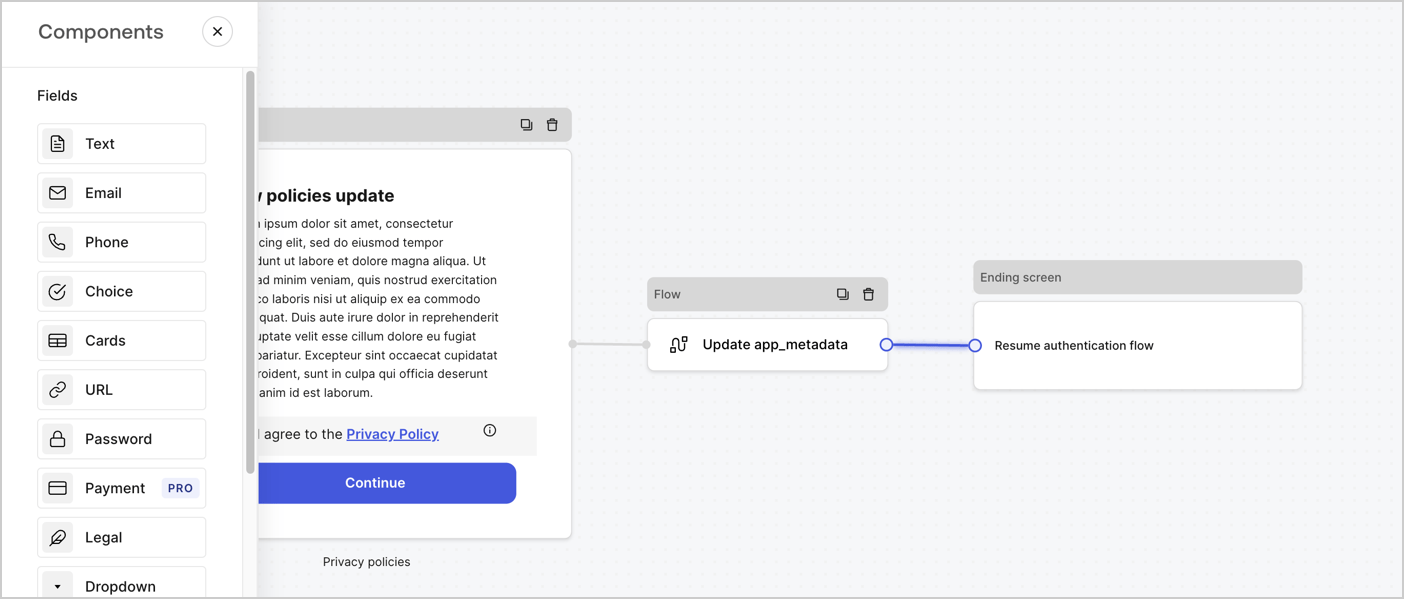
Add a **Flow** node after the **Step** node to update the `app_metadata` and resume the authentication flow by following these steps:

1. Select **Flow** from the bottom of the Form editor.
2. Remove the existing link between the **Step** and **Ending Screen** nodes.
3. Select the new **Flow** > **Click to add a flow** > **Create a new flow.**

   * Enter `Update app_metadata` in the **Name** field.
   * Select **Create**.
   * Select **Save**.
4. Link the **Flow** node to the **Step** and **Ending Screen** nodes as pictured below.
5. Select **Publish** to save.
<Frame>
  <img src="https://mintcdn.com/docs-staging-fix-docs-5528-php-updates/UZQyD4QENz6NalUU/docs/images/cdy7uua7fh8z/6YIkzm7SrpM9LW76AXuRzh/353c518fe82bbaa440836da1d83596d6/link-policies.png?fit=max&auto=format&n=UZQyD4QENz6NalUU&q=85&s=5769307872a5a9b31bf062c6cf49f24c" alt="Dashboard > Actions > Forms > Form" data-og-width="1404" width="1404" data-og-height="599" height="599" data-path="docs/images/cdy7uua7fh8z/6YIkzm7SrpM9LW76AXuRzh/353c518fe82bbaa440836da1d83596d6/link-policies.png" data-optimize="true" data-opv="3" srcset="https://mintcdn.com/docs-staging-fix-docs-5528-php-updates/UZQyD4QENz6NalUU/docs/images/cdy7uua7fh8z/6YIkzm7SrpM9LW76AXuRzh/353c518fe82bbaa440836da1d83596d6/link-policies.png?w=280&fit=max&auto=format&n=UZQyD4QENz6NalUU&q=85&s=185e8af94e3570837cbf8d585a512297 280w, https://mintcdn.com/docs-staging-fix-docs-5528-php-updates/UZQyD4QENz6NalUU/docs/images/cdy7uua7fh8z/6YIkzm7SrpM9LW76AXuRzh/353c518fe82bbaa440836da1d83596d6/link-policies.png?w=560&fit=max&auto=format&n=UZQyD4QENz6NalUU&q=85&s=bba555b56de496c6bd0d42fdb1e0eb9f 560w, https://mintcdn.com/docs-staging-fix-docs-5528-php-updates/UZQyD4QENz6NalUU/docs/images/cdy7uua7fh8z/6YIkzm7SrpM9LW76AXuRzh/353c518fe82bbaa440836da1d83596d6/link-policies.png?w=840&fit=max&auto=format&n=UZQyD4QENz6NalUU&q=85&s=66f89de20615dd8574da375b7aed8f6c 840w, https://mintcdn.com/docs-staging-fix-docs-5528-php-updates/UZQyD4QENz6NalUU/docs/images/cdy7uua7fh8z/6YIkzm7SrpM9LW76AXuRzh/353c518fe82bbaa440836da1d83596d6/link-policies.png?w=1100&fit=max&auto=format&n=UZQyD4QENz6NalUU&q=85&s=3e9abc626ef7869d19ab9fe1e41fc17c 1100w, https://mintcdn.com/docs-staging-fix-docs-5528-php-updates/UZQyD4QENz6NalUU/docs/images/cdy7uua7fh8z/6YIkzm7SrpM9LW76AXuRzh/353c518fe82bbaa440836da1d83596d6/link-policies.png?w=1650&fit=max&auto=format&n=UZQyD4QENz6NalUU&q=85&s=d94fa51cb55a11f3de3907a17e8983ed 1650w, https://mintcdn.com/docs-staging-fix-docs-5528-php-updates/UZQyD4QENz6NalUU/docs/images/cdy7uua7fh8z/6YIkzm7SrpM9LW76AXuRzh/353c518fe82bbaa440836da1d83596d6/link-policies.png?w=2500&fit=max&auto=format&n=UZQyD4QENz6NalUU&q=85&s=ad29445027b67461b92626145bb69c28 2500w" />
</Frame>

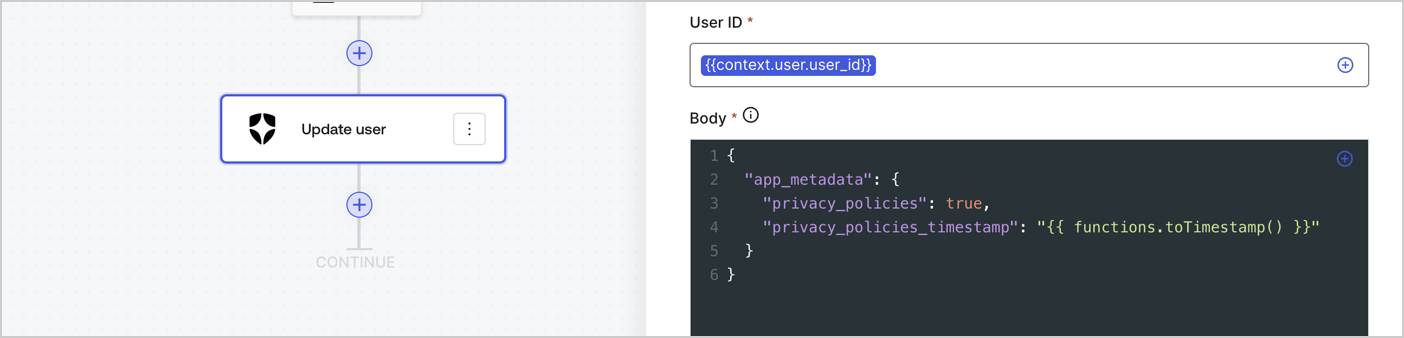
Add an Auth0 Update user action to the flow by following these steps:

1. Select the **Flow** **Update app\_metadata** > **Edit flow** to open the Flow editor in a new tab.
2. Below the StartAction, select the **+** icon to add an **Update user** action. Complete the fields below, then select **Save** to continue.

   * **Connection**: Select from the dropdown the Vault connection to your M2M application.

   * **User ID**: Enter `{{context.user.user_id}}`.

   * **Body**: Copy and paste the following code to update the app\_metadata with the privacy\_policies and privacy\_policies\_timestamp properties.

     ```text lines theme={null}
     {
       "app_metadata": {
         "privacy_policies": true,
         "privacy_policies_timestamp": "{{ functions.toTimestamp() }}"
       }
     }
     ```

   * Select **Save**.
3. Select **Publish** to save.
<Frame>
  <img src="https://mintcdn.com/docs-staging-fix-docs-5528-php-updates/TftvvAzu7cRTdnMZ/docs/images/cdy7uua7fh8z/CvMNIwWrOUwaFW4X3G28p/1fb70ae57a20749d9ffaaba8dc0b7e26/update-user-privacy.png?fit=max&auto=format&n=TftvvAzu7cRTdnMZ&q=85&s=fd8e6d27f6b431e40418464438d90e81" alt="Dashboard > Actions > Forms > User case privacy policy code" data-og-width="1404" width="1404" data-og-height="338" height="338" data-path="docs/images/cdy7uua7fh8z/CvMNIwWrOUwaFW4X3G28p/1fb70ae57a20749d9ffaaba8dc0b7e26/update-user-privacy.png" data-optimize="true" data-opv="3" srcset="https://mintcdn.com/docs-staging-fix-docs-5528-php-updates/TftvvAzu7cRTdnMZ/docs/images/cdy7uua7fh8z/CvMNIwWrOUwaFW4X3G28p/1fb70ae57a20749d9ffaaba8dc0b7e26/update-user-privacy.png?w=280&fit=max&auto=format&n=TftvvAzu7cRTdnMZ&q=85&s=672d2cd0ffdd1052ed25bde47ff65b31 280w, https://mintcdn.com/docs-staging-fix-docs-5528-php-updates/TftvvAzu7cRTdnMZ/docs/images/cdy7uua7fh8z/CvMNIwWrOUwaFW4X3G28p/1fb70ae57a20749d9ffaaba8dc0b7e26/update-user-privacy.png?w=560&fit=max&auto=format&n=TftvvAzu7cRTdnMZ&q=85&s=01c45882a8a375c6699982632ed7a9c2 560w, https://mintcdn.com/docs-staging-fix-docs-5528-php-updates/TftvvAzu7cRTdnMZ/docs/images/cdy7uua7fh8z/CvMNIwWrOUwaFW4X3G28p/1fb70ae57a20749d9ffaaba8dc0b7e26/update-user-privacy.png?w=840&fit=max&auto=format&n=TftvvAzu7cRTdnMZ&q=85&s=24374c5ea1184040f7a9167b766777ae 840w, https://mintcdn.com/docs-staging-fix-docs-5528-php-updates/TftvvAzu7cRTdnMZ/docs/images/cdy7uua7fh8z/CvMNIwWrOUwaFW4X3G28p/1fb70ae57a20749d9ffaaba8dc0b7e26/update-user-privacy.png?w=1100&fit=max&auto=format&n=TftvvAzu7cRTdnMZ&q=85&s=6adf293d68542bfd4d5f36294da706b9 1100w, https://mintcdn.com/docs-staging-fix-docs-5528-php-updates/TftvvAzu7cRTdnMZ/docs/images/cdy7uua7fh8z/CvMNIwWrOUwaFW4X3G28p/1fb70ae57a20749d9ffaaba8dc0b7e26/update-user-privacy.png?w=1650&fit=max&auto=format&n=TftvvAzu7cRTdnMZ&q=85&s=f56ba5eb8c4f8635b97e392d331edfc9 1650w, https://mintcdn.com/docs-staging-fix-docs-5528-php-updates/TftvvAzu7cRTdnMZ/docs/images/cdy7uua7fh8z/CvMNIwWrOUwaFW4X3G28p/1fb70ae57a20749d9ffaaba8dc0b7e26/update-user-privacy.png?w=2500&fit=max&auto=format&n=TftvvAzu7cRTdnMZ&q=85&s=75a835aad5c271e2abee8788c928263f 2500w" />
</Frame>

<Callout icon="file-lines" color="#0EA5E9" iconType="regular">
  The flow **Update app\_metadata** adds a `privacy_policies true` value to the app`_metadata` object and also generates a timestamp with a [helper function.](/docs/customize/forms/variables)
</Callout>

## Retrieve the form render code

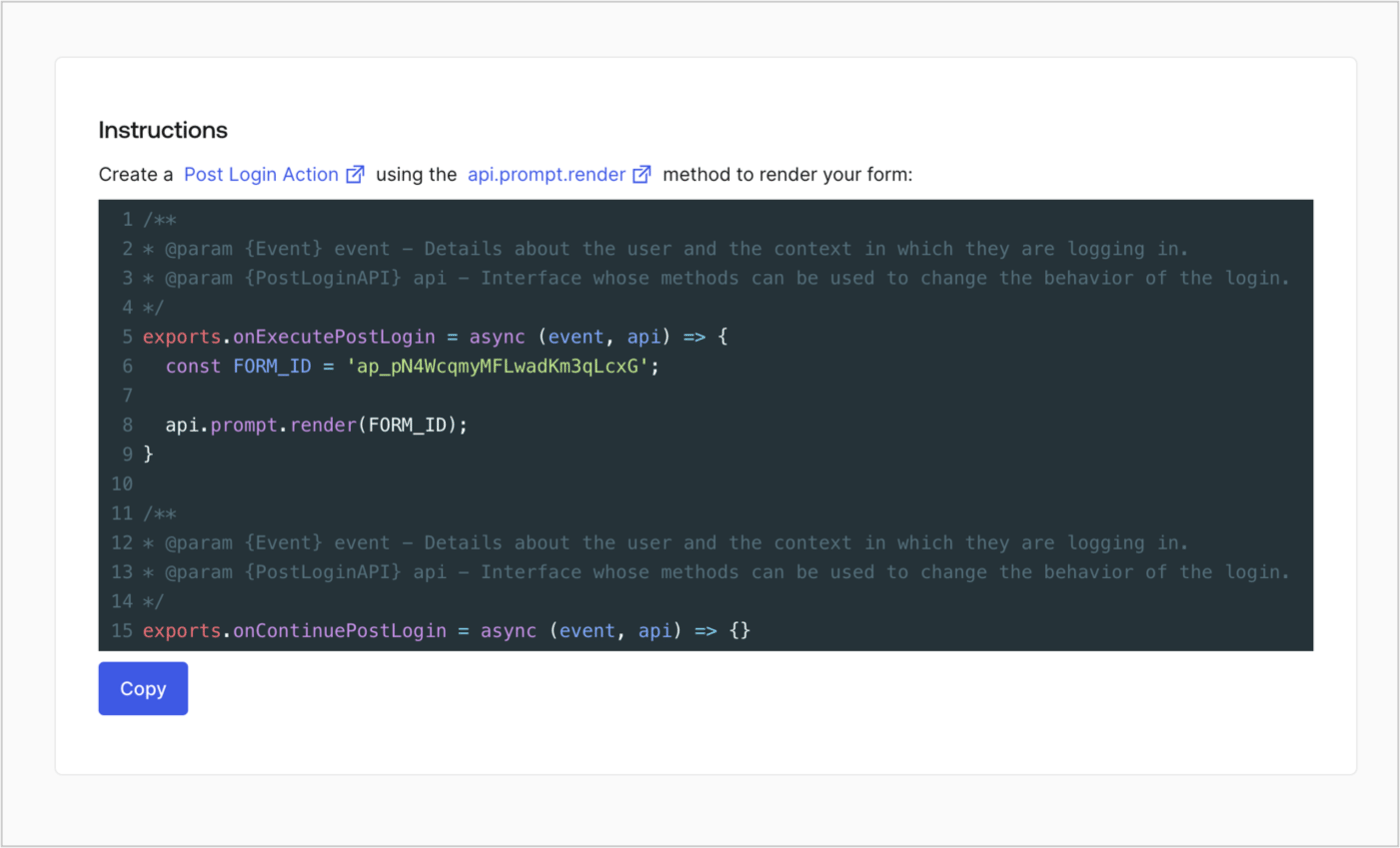
Retrieve your form render code to visually render the form with a custom Post Login Action by following these steps:

* From the Form editor, select **`<> Render`**.
* Select **Copy**.
<Frame>
  <img src="https://mintcdn.com/docs-staging-fix-docs-5528-php-updates/dqm8aw6n6ZIjPAV9/docs/images/cdy7uua7fh8z/2EIUzc539sq9lwoTKbjoJv/496a864c0fc44a782c9cadca119dbfb0/embed.png?fit=max&auto=format&n=dqm8aw6n6ZIjPAV9&q=85&s=87426ea3c20b855d2557ff4c2115365b" alt="Dashboard > Actions > Forms > Form > Embed" data-og-width="1400" width="1400" data-og-height="848" height="848" data-path="docs/images/cdy7uua7fh8z/2EIUzc539sq9lwoTKbjoJv/496a864c0fc44a782c9cadca119dbfb0/embed.png" data-optimize="true" data-opv="3" srcset="https://mintcdn.com/docs-staging-fix-docs-5528-php-updates/dqm8aw6n6ZIjPAV9/docs/images/cdy7uua7fh8z/2EIUzc539sq9lwoTKbjoJv/496a864c0fc44a782c9cadca119dbfb0/embed.png?w=280&fit=max&auto=format&n=dqm8aw6n6ZIjPAV9&q=85&s=6ac4d03e20eabf9d8aec70feb1f5b93d 280w, https://mintcdn.com/docs-staging-fix-docs-5528-php-updates/dqm8aw6n6ZIjPAV9/docs/images/cdy7uua7fh8z/2EIUzc539sq9lwoTKbjoJv/496a864c0fc44a782c9cadca119dbfb0/embed.png?w=560&fit=max&auto=format&n=dqm8aw6n6ZIjPAV9&q=85&s=24f9b396bdbed31a0afd9ecc3c2da217 560w, https://mintcdn.com/docs-staging-fix-docs-5528-php-updates/dqm8aw6n6ZIjPAV9/docs/images/cdy7uua7fh8z/2EIUzc539sq9lwoTKbjoJv/496a864c0fc44a782c9cadca119dbfb0/embed.png?w=840&fit=max&auto=format&n=dqm8aw6n6ZIjPAV9&q=85&s=71531d41f3f7c480b30b3e49f0cf6acb 840w, https://mintcdn.com/docs-staging-fix-docs-5528-php-updates/dqm8aw6n6ZIjPAV9/docs/images/cdy7uua7fh8z/2EIUzc539sq9lwoTKbjoJv/496a864c0fc44a782c9cadca119dbfb0/embed.png?w=1100&fit=max&auto=format&n=dqm8aw6n6ZIjPAV9&q=85&s=c345eb27f03f21101b784684a0133d58 1100w, https://mintcdn.com/docs-staging-fix-docs-5528-php-updates/dqm8aw6n6ZIjPAV9/docs/images/cdy7uua7fh8z/2EIUzc539sq9lwoTKbjoJv/496a864c0fc44a782c9cadca119dbfb0/embed.png?w=1650&fit=max&auto=format&n=dqm8aw6n6ZIjPAV9&q=85&s=adf0ec8cd4271edb6acbc83fcd4133e4 1650w, https://mintcdn.com/docs-staging-fix-docs-5528-php-updates/dqm8aw6n6ZIjPAV9/docs/images/cdy7uua7fh8z/2EIUzc539sq9lwoTKbjoJv/496a864c0fc44a782c9cadca119dbfb0/embed.png?w=2500&fit=max&auto=format&n=dqm8aw6n6ZIjPAV9&q=85&s=ae9d23adbfa2c7d51d2072267f5eacf7 2500w" />
</Frame>

## Create a Post Login Action

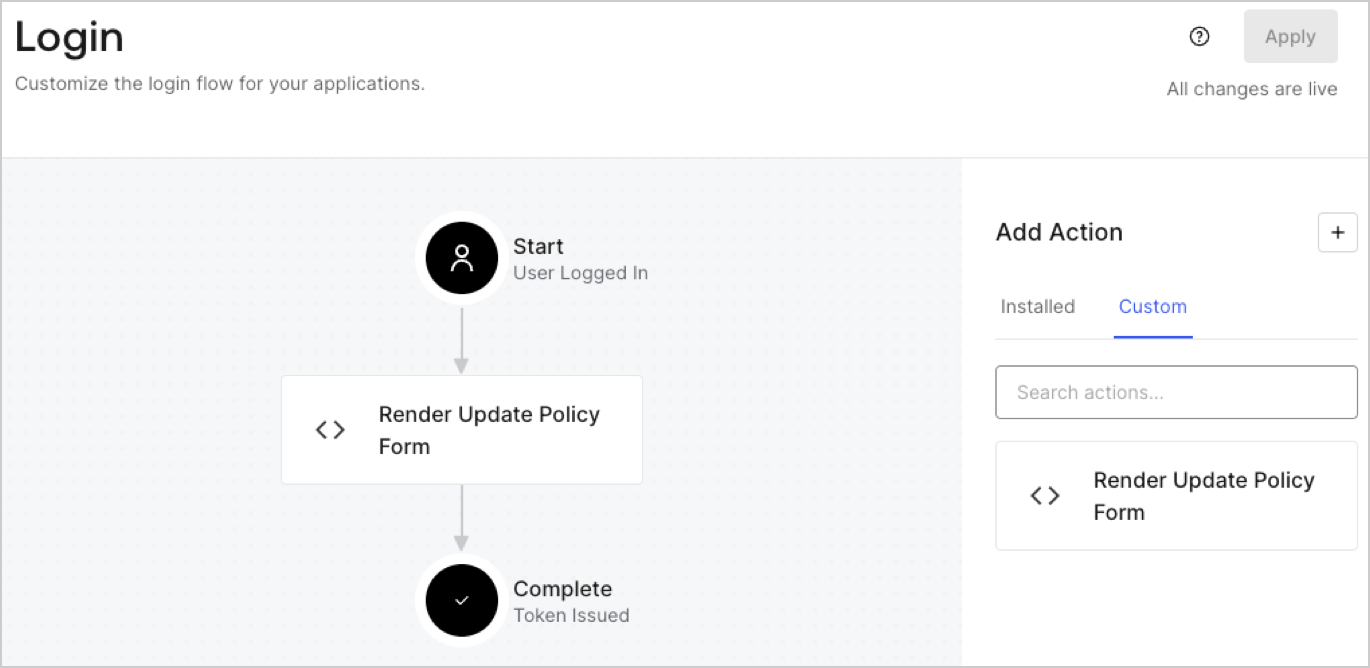
Create a post-login Action to render your form by following these steps:

1. Navigate to **Auth0 Dashboard > Actions > Flows > Login.**
2. Select the **+** icon and Select **Build from scratch**:

   * **Name**: Enter `Render Update Policy Form`.
   * **Trigger**: Select `Login / Post Login`.
   * **Runtime**: Select the recommended version.
3. Select **Create**.

To configure the post-login Action:

1. Delete the existing code from the Code editor.
2. Paste the form render code into the Code editor.
3. Edit the code to define the conditional logic that will render the form.

   ```javascript lines theme={null}
   /**
   * @param {Event} event - Details about the user and the context in which they are logging in.
   * @param {PostLoginAPI} api - Interface whose methods can be used to change the behavior of the login.
   */
   exports.onExecutePostLogin = async (event, api) => {
     const FORM_ID = 'REPLACE_WITH_YOUR_FORM_ID';

     if (event.user.app_metadata.privacy_policies !== true) {
       api.prompt.render(FORM_ID);
     }
   }

   exports.onContinuePostLogin = async (event, api) => { }
   ```

   <Callout icon="file-lines" color="#0EA5E9" iconType="regular">
     The example code above will render the form when a user is missing the app metadata `privacy_policies` property.
   </Callout>
4. Select **Deploy.**
5. Drag and Drop the **Render Update Policy Form** Action to the **Login** flow.
   <Frame>
     <img src="https://mintcdn.com/docs-staging-fix-docs-5528-php-updates/UYIULpdfMnIDvH7z/docs/images/cdy7uua7fh8z/5TOwDgevZsBqd7yZynUYWU/41ca909dc3007aed4f40ff794a05efa5/postlogin.png?fit=max&auto=format&n=UYIULpdfMnIDvH7z&q=85&s=24a85b068a0eb95df25ea7eedc84779b" alt="Dashboard > Forms > Use Case > Render update policy form login action" data-og-width="1370" width="1370" data-og-height="668" height="668" data-path="docs/images/cdy7uua7fh8z/5TOwDgevZsBqd7yZynUYWU/41ca909dc3007aed4f40ff794a05efa5/postlogin.png" data-optimize="true" data-opv="3" srcset="https://mintcdn.com/docs-staging-fix-docs-5528-php-updates/UYIULpdfMnIDvH7z/docs/images/cdy7uua7fh8z/5TOwDgevZsBqd7yZynUYWU/41ca909dc3007aed4f40ff794a05efa5/postlogin.png?w=280&fit=max&auto=format&n=UYIULpdfMnIDvH7z&q=85&s=7902802df6ac59a2ab1c13896d06cbd3 280w, https://mintcdn.com/docs-staging-fix-docs-5528-php-updates/UYIULpdfMnIDvH7z/docs/images/cdy7uua7fh8z/5TOwDgevZsBqd7yZynUYWU/41ca909dc3007aed4f40ff794a05efa5/postlogin.png?w=560&fit=max&auto=format&n=UYIULpdfMnIDvH7z&q=85&s=629f5b6d60f9ea981ec1f6073b042dfd 560w, https://mintcdn.com/docs-staging-fix-docs-5528-php-updates/UYIULpdfMnIDvH7z/docs/images/cdy7uua7fh8z/5TOwDgevZsBqd7yZynUYWU/41ca909dc3007aed4f40ff794a05efa5/postlogin.png?w=840&fit=max&auto=format&n=UYIULpdfMnIDvH7z&q=85&s=00cb8c9168c4e0a3988110aa35deecc4 840w, https://mintcdn.com/docs-staging-fix-docs-5528-php-updates/UYIULpdfMnIDvH7z/docs/images/cdy7uua7fh8z/5TOwDgevZsBqd7yZynUYWU/41ca909dc3007aed4f40ff794a05efa5/postlogin.png?w=1100&fit=max&auto=format&n=UYIULpdfMnIDvH7z&q=85&s=15786a84a2605f492a68fc32aeb2888c 1100w, https://mintcdn.com/docs-staging-fix-docs-5528-php-updates/UYIULpdfMnIDvH7z/docs/images/cdy7uua7fh8z/5TOwDgevZsBqd7yZynUYWU/41ca909dc3007aed4f40ff794a05efa5/postlogin.png?w=1650&fit=max&auto=format&n=UYIULpdfMnIDvH7z&q=85&s=5f540bb4ab4d87e9c3c12a2ec678e866 1650w, https://mintcdn.com/docs-staging-fix-docs-5528-php-updates/UYIULpdfMnIDvH7z/docs/images/cdy7uua7fh8z/5TOwDgevZsBqd7yZynUYWU/41ca909dc3007aed4f40ff794a05efa5/postlogin.png?w=2500&fit=max&auto=format&n=UYIULpdfMnIDvH7z&q=85&s=b26637dbd92094f79493228bb8090d03 2500w" />
   </Frame>
6. Select **Apply.**

### Test implementation

Test the implementation by following these steps:

1. Log in with an existing user whose app`_metadata` attribute `privacy_policies` does not have a value.
2. The post-login Action in the Login flow will render the form and prompt for acceptance.
3. Select **Auth0 Dashboard > User Management > Users,** locate the user and verify that the `app_metadata` attribute `privacy_policies` contains a `true` value and a timestamp.
